Say you give an agent your team’s documentation. All of it, pasted straight into the context window, because it fits: two hundred pages, about 300,000 tokens. You ask how refunds work on annual plans, and it gets the answer wrong. The right page was in there, somewhere in the middle. The model just didn’t use it.
The instinct is to fix the prompt: add “read the documentation carefully”, put it in capitals, move it to the end. That rarely helps, because the prompt was never the problem. The problem was what the model could see, how much of it there was, and where the right page sat.
That’s the shift people mean by context engineering.1 Prompt engineering asks how should I phrase this? Context engineering asks what can the model see right now, and how did it get there? One is a writing problem. The other is a systems problem.
I’d go further. An agent is a computer, in the hardware sense. The model is the processor, the context window is RAM, tools are peripherals, files are storage, and the harness is the motherboard that connects them.
The idea comes from Andrej Karpathy, who calls it the “LLM OS”. I got it from his talk Software Is Changing (Again), and if you haven’t seen it, watch the whole thing.2
I’m going to take the idea literally, because it keeps giving the right engineering answer. In that picture, context engineering is memory management, and memory is where most agents fail. That’s most of this post, but first, the whole machine.
An agent is a computer
Here’s each part, what it is in an agent, and what you get to decide about it:
| Part | In an agent | What you decide |
|---|---|---|
| CPU | The model | Speed, capability and price per token |
| Firmware | The weights | Nothing. It ships with the chip and is frozen at its training date |
| Cache | The KV or prompt cache | What stays identical between calls |
| RAM | The context window | What’s loaded right now |
| Storage | Files and knowledge bases | How it’s laid out, so the agent can find things |
| Peripherals | Tools | Which devices to plug in, and what they send back |
| Network card | Web, APIs, other models | What the agent can reach outside the box |
| Clock | The agent loop | How many steps it runs, and when it stops |
| Cores | Subagents | Whether to split work across separate contexts |
| Motherboard | The harness | How all of the above is wired together |
Most of us don’t build CPUs. We buy them from Anthropic, OpenAI or Google and swap them when a better one ships. Everything else in that table is ours to build. A fast CPU with too little RAM and a slow disk is still a slow machine, and agents work the same way. I’ve seen one model do well in one harness and badly in another, and the difference was almost never the model.
On every step of the agent loop, the CPU reads all of RAM from the start and writes only a little. Agents read far more than they write, so like most real computers, they’re limited by memory, not compute. That’s where we start.
RAM is smaller than the spec sheet says
Context windows are huge now, sometimes a million tokens. So why not load everything?
Because the advertised size isn’t the usable size. Real RAM works the same at 10% full or 90% full. Context doesn’t.
Models use information best at the start or end of their input and noticeably worse in the middle, even models built for long contexts.3 And across 18 models, including Claude, GPT, Gemini and Qwen, performance gets less reliable as input grows, even on simple tasks:4
- One similar but irrelevant passage hurts. A single distractor lowered accuracy. Four lowered it further.
- Focused beats full. Given either a 113,000-token conversation history or only the ~300 tokens that mattered, every model did better with the 300.
- Even copying degrades. Asked to repeat a long word sequence with one odd word inserted, every model got worse as the sequence grew.
Think of it as an attention budget. Attention is relative, so every token you add takes a little attention from the rest, and irrelevant tokens dilute the ones that matter.
So treat context as RAM that gets slower and less reliable the fuller it is. The question isn’t “can I fit it?” It’s “what’s the smallest working set that does the job?”
The cache: why layout order matters
Ever noticed your plan lasting longer than the token counts say it should? Especially in Copilot, where usage is some strange product of requests and per-model multipliers. Caching is a big part of the answer. Most of what an agent sends on each step is a cache hit, which costs a twentieth of a fresh token. Break the cache and the same session burns through your limit much faster.
Like a CPU cache, the KV cache saves redoing recent work. The model stores an internal representation of every token it reads, and if the next request starts with exactly the same prefix, the provider reuses it. That’s prompt caching, and it’s priced very differently from fresh input:5
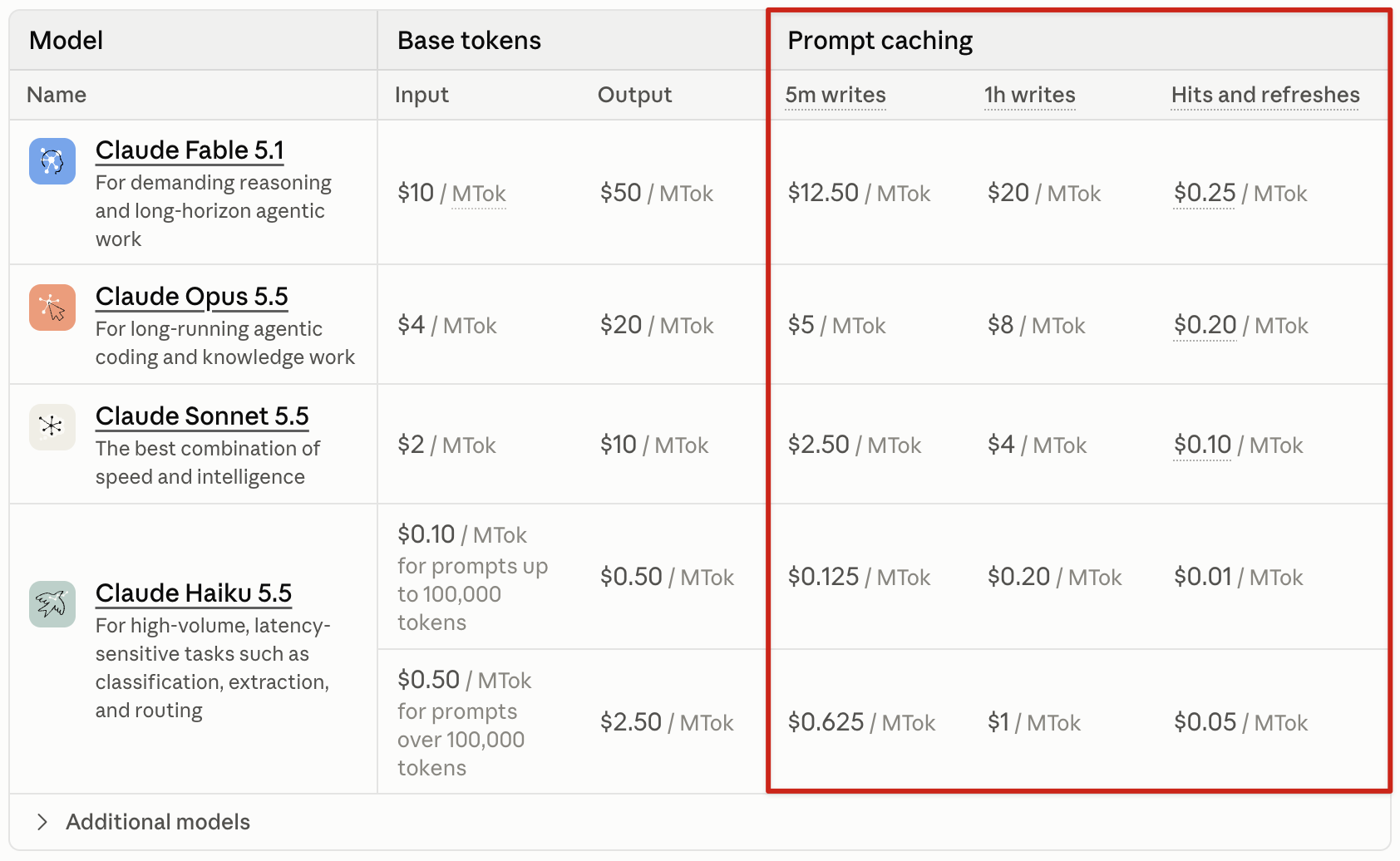
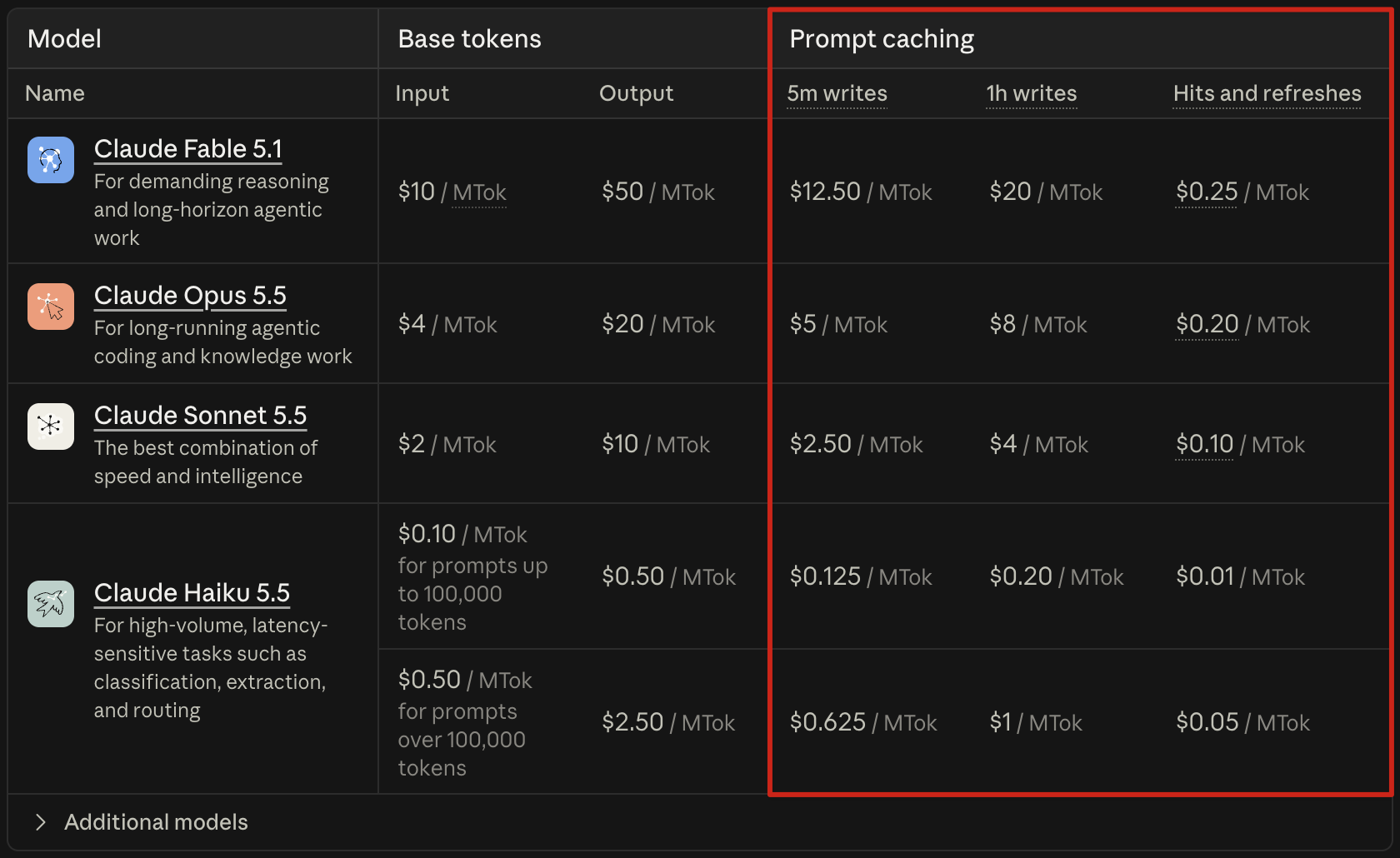
On Sonnet 5.5, fresh input is $2 per million tokens and a cache hit is $0.10. Writing to the cache costs $2.50, or $4 to keep it for an hour. That gap decides the bill, because agents are almost all input: around 100 input tokens for every token of output.6
Take a 50-step session that adds 2,400 tokens per step. Each step re-reads everything before it, so that’s 3 million input tokens:
| Input cost on Sonnet 5.5 | |
|---|---|
| No caching | 3M read at $2 = $6.00 |
| Caching | 120K written at $2.50 + 2.88M read at $0.10 = $0.59 |
Same work, a tenth of the price. Output costs the same either way.
A hit needs a byte-identical prefix, so layout matters:
- Keep the prefix stable. One changed token invalidates everything after it. A timestamp, to the second, at the top of the system prompt breaks it on every call.
- Append, don’t edit. Changing an earlier step breaks the cache from that point. Even JSON with unstable key order does it.
- Don’t swap tools mid-task. Tool definitions sit near the front. Keep every tool defined and restrict which ones the model can pick instead.
The rule: order context from most stable to least stable. System instructions, tool definitions, the knowledge base index, the task, then whatever changes each step.
Paging: moving data in and out
If RAM is small and unreliable, you need paging: bring data in from storage when you need it, and push it out when you’re done.
MemGPT, a 2023 Berkeley paper subtitled “Towards LLMs as Operating Systems”, built exactly this.7 It splits memory into a main context (the prompt) and an external context (a database the model can search). The model manages both through function calls. At around 70% full, the system warns the model so it can save anything important. When the prompt fills up, the oldest messages are evicted and folded into a running summary. Claude Code does something similar when it compacts a long conversation.
A better version is restorable compression: drop a web page’s content but keep its URL, drop a document’s contents but keep its path.6
That’s a page table. The content is evicted, but its address stays, so the model can load it back if it turns out to matter. A summary loses detail and can’t be reversed. A path costs a few tokens and loses nothing. So before you drop anything from context, check that you’re keeping its address. A file path is a pointer: ten tokens that stand in for ten thousand.
A good path is also a summary. An agent can probably guess what
src/billing/refunds.js does from the name alone, so it can decide whether to
read the file at all without opening it. A file called utils2.js tells it
nothing, so it has to read the whole thing to find out.
Storage: how to lay out a knowledge base
The default way to give an agent knowledge is retrieval-augmented generation, or RAG. You split your documents into chunks, embed them, and at query time you paste in the chunks most similar to the question.
As a storage design, RAG is odd. It reads the disk in random 500-token fragments, picked by how similar they sound to the question rather than by what the task needs. Each chunk arrives without its surroundings, so the model doesn’t know which document it came from. And nothing carries over between questions, so the model rediscovers the same knowledge from scratch every time.
Coding agents went a different way. Boris Cherny, who created Claude Code, has said the team started with a vector database. Then they tried agentic search, where the model uses glob and grep to find files itself, and it “outperformed everything else by a lot.”8 He’s said the evidence was mostly internal vibes, not a benchmark. Still, nearly every coding agent now works this way.
Agentic search works because code already has structure: directories, files and functions, with names that mean something. The agent looks at a folder, decides what’s relevant, and goes deeper. Knowledge bases should copy that.
Progressive disclosure
Progressive disclosure means showing the agent a small summary first and letting it ask for more.9 Anthropic’s Agent Skills are the cleanest example I know of. They load in three levels:10
- Metadata. Every skill’s name and one-line description sit in the system prompt from the start, so the model knows when a skill might help.
- The skill file. If a skill looks relevant, the model reads its full
SKILL.md. - Linked files. If the skill points to more detail, such as a reference for one specific form, the model reads that only when it needs it.
Because of this, the amount of context a skill can bundle is effectively unbounded. RAM stays small, and the disk can be as big as you like, as long as the hierarchy is good.
Fan-out: your knowledge base is a B-tree
Databases store indexes on disk as B-trees: very wide, very shallow trees. Each node holds many keys, so the tree stays only a few levels deep. That matters because every level is another slow disk read.
An agent reading a knowledge base has the same cost model. Every hop is a tool call, which adds latency, and every file it opens costs tokens. So you want few hops, and each one cheap. Take 200 pages of documentation at about 1,500 tokens each:
| Approach | What the agent reads | Tokens |
|---|---|---|
| Load everything | All 200 pages | ~300,000 |
| Walk the tree | Top index, one section index, one page | ~2,300 |
That’s over a hundred times fewer tokens, and almost all of them are relevant. The cost also barely grows. With 20 entries per index and three levels, the agent can reach 8,000 pages and still read only three indexes and a page. As with a B-tree, the cost grows with the depth of the tree, not its size.
The trade-off is the same too. Wider indexes mean fewer hops, but each one costs more tokens and is harder to scan. Narrower indexes are cheap to read but need more hops. I’ve found 10 to 30 entries per index, two or three levels deep, works well, but it depends on your content.
Information scent
The tree only works if the agent picks the right branch at each level.
In the 1990s, Peter Pirolli and Stuart Card at Xerox PARC proposed information foraging theory.11 People look for information the way animals look for food: they follow cues that suggest a path leads somewhere useful. Pirolli and Card called those cues information scent. A link labelled “Refund policy” has strong scent for someone who wants a refund. A link labelled “Resources” has almost none.
An agent walking your knowledge base does the same thing, and the index descriptions are the only scent it has. If they’re vague, it guesses or opens several branches to check, and both cost tokens. So the most important writing in a knowledge base is the one-line description in each index. Compare:
| |
| |
The second costs about thirty more tokens. In exchange, the agent knows what’s
inside, when to go in, and when not to. It does the same job as a skill’s
description field: it decides whether anything below it gets read.
Locality and thrashing
Locality means programs tend to use data stored near data they just used, and hardware is built around that. In a knowledge base, it means putting things that are used together in the same place. If a refund question always needs the refund policy and the payment provider’s quirks, put them in the same folder, or the same page. Then the agent’s reads stay inside one branch.
Thrashing is what Peter Denning described in 1968: a program’s working set, the pages it actively needs, doesn’t fit in memory.12 The system spends all its time swapping pages in and out and does almost no real work.
Agents thrash too. The agent opens a file, decides it’s not quite right, opens a sibling, then another, then goes back to the first. Or it reads the same file twice because the first copy was compacted away. The cause is almost always structure, not the model. Either the descriptions were too vague to pick a branch, or the information was spread across so many pages that the working set didn’t fit. The fixes are the classic ones: sharpen the descriptions, or merge pages that are always read together.
Pinned memory
Operating systems call data that’s never swapped out pinned memory. The agent
equivalent is the always-loaded file: CLAUDE.md, AGENTS.md, or skill
metadata. Claude Code loads CLAUDE.md up front and uses glob and grep for
everything else.13 That split is right, but every pinned line is paid
for on every step and competes for attention, so keep the pinned set small.
It’s worth getting right. One small study tracked 200 interactions with AI tools. With a standing guidance document given as a file, 89% of outputs were accepted first time. With the same guidance typed into the chat, 64%. With no guidance, 29%.14 It’s one person scoring their own work against a baseline that wasn’t randomised, so I wouldn’t lean on the exact numbers. But the direction matches what I see.
My rule: the pinned file holds only rules that apply to nearly every task, plus the top-level index. Anything for one kind of task belongs in storage, behind a description good enough that the agent finds it.
Keep that file in the repo and review changes to it like code. It’s read on every step, so a bad line in it does more damage than a bad line almost anywhere else. (That’s one of my laws of AI-augmented engineering.)
Who writes to storage?
Knowledge bases decay because nobody maintains them. Pages go stale, indexes stop matching the files, and two pages quietly contradict each other.
In April 2026, Karpathy posted a pattern he called an LLM Wiki for this.15
Raw sources (articles, papers, notes) never change. On top of them, the LLM
writes and maintains a wiki of interlinked markdown pages. A schema file, like
CLAUDE.md or AGENTS.md, tells it how the wiki is organised. An index.md
lists every page with a one-line summary, and the LLM reads it first. An
append-only log.md records what changed and when. At around 100 sources and
a few hundred pages, the index alone is enough, with no embeddings.
Human wikis die because nobody wants to do the bookkeeping. An LLM doesn’t get bored, doesn’t forget a cross-reference, and can update 15 files in one pass. The pattern has three operations, and they map onto storage:
| Operation | What happens | Storage equivalent |
|---|---|---|
| Ingest | Read a new source, update the pages and index it affects | Writing to disk |
| Query | Read the index, open the right pages, answer, file good answers back | Reading, with write-back |
| Lint | Look for contradictions, stale claims, orphan pages and missing links | fsck |
Write-back means that when a question takes real work to answer, the answer becomes a new page. Next time, it’s one read instead of a re-derivation. That’s a cache on disk.
The same trick works within a single task. The agent keeps a todo.md and
rewrites it as it goes.6 The rewritten plan always lands at the end of
the context, where the model pays most attention.
Peripherals: every device costs memory
Tools are how the CPU reaches anything outside itself: a terminal, a code runner, a browser, a database client. MCP gave them a standard port, a USB-C for AI apps.16 Adding a tool now takes one line of config, which makes two costs easy to miss.
Every device takes memory at boot. Each tool’s name, description and input schema sits in RAM on every step, whether it’s used or not. Plug in fifty tools and a real share of the context is gone before the task starts, and the model has to choose between fifty options every step. The fix is progressive disclosure again: load short descriptions first and full definitions on demand, which is what Skills do. In one study, retrieving only the relevant tool descriptions roughly tripled how often the model picked the right tool.17
Every device writes straight into RAM. Whatever a tool returns lands in context and stays there. A tool that dumps a 20,000-line log fills memory in one call. Good tools return small, shaped results, with a path or an ID to fetch more. That’s the page-table trick again: return the address, not the content.
More cores: subagents
When one processor isn’t enough, you add cores. Subagents are separate model instances, each with its own context window, that a lead agent hands work to.
Anthropic built its research feature this way.18 A lead agent with subagents beat a single Claude Opus 4 agent by 90.2% on their internal research evaluation. The reason is memory, not intelligence. Each subagent reads widely in its own context and sends back a short result, so the lead agent’s context stays small.
The cost is tokens. Multi-agent systems use about 15 times more tokens than chat, and on one benchmark, token usage alone explained 80% of the variance in performance. More cores means more total RAM, and more RAM mostly means better answers, at a price.
A day earlier, Cognition, who build the coding agent Devin, published the opposite advice: don’t build multi-agent systems.19 Their argument is about what the cores don’t share: “Actions carry implicit decisions, and conflicting decisions carry bad results.” In their example, two subagents each build part of a Flappy Bird clone. One builds a Super Mario-style background. The other builds a bird that doesn’t look or move like the original. Neither can see what the other decided.
Both are right, about different kinds of work. This is the oldest problem in multicore design: cores with separate memory don’t see each other’s writes. Independent reading, like researching ten sources, splits well because the cores don’t need to agree on anything. Work where every step depends on earlier decisions, like writing one codebase, doesn’t split, because those decisions are the shared state. So I use extra cores for reading and keep writing on one core.
Where the analogy breaks
- Real RAM doesn’t degrade as it fills. Context does. So you don’t just avoid running out, you avoid getting close.
- The CPU manages its own memory. In a real computer, the operating system decides what to page. In an agent, the model mostly decides what to read, which is why index descriptions matter so much. You’re not writing the paging algorithm. You’re laying out storage so a fairly capable, easily distracted reader pages well.
- Reads can’t be undone. Once something is read into context, it stays until compaction, so a bad read costs you for the rest of the task.
- Nothing is deterministic. The same agent can walk the same tree differently twice. Good structure makes good paths likely, not guaranteed.
My build sheet
When I put an agent together now, I spec it like a machine:
- CPU: pick the model last, not first. Most problems I’ve blamed on the model turned out to be somewhere else on this list.
- RAM: load the smallest working set that does the job. Pin very little: a short always-loaded file with global rules and the top-level index.
- Cache: order context from most stable to least stable, and never put a timestamp at the top.
- Paging: evict to a path, not a summary. If something can be re-read, drop it and keep the address.
- Storage: a shallow, wide tree with an index in every folder and small pages about one thing each. Spend real effort on the one-line descriptions. Keep things that are used together in one place, and let the agent maintain it.
- Peripherals: plug in fewer tools, load their definitions on demand, and make them return small results with pointers.
- Cores: use subagents for wide, independent reading. Keep decisions that depend on each other on one core.
Prompt engineering was about writing a good message to one chip. Building an agent means building the whole machine around it, and most of that machine is memory. Context engineering is memory management, and we already know a lot about how to do that.
The term took off after Tobi Lütke tweeted in June 2025 that he preferred it to prompt engineering, describing it as “the art of providing all the context for the task to be plausibly solvable by the LLM.” ↩︎
Karpathy gave Software Is Changing (Again) at YC’s AI Startup School in June 2025; the link starts at the LLM OS section. He first sketched the idea in late 2023, in his Intro to Large Language Models talk. The parts list and diagrams here are my extension of his picture. ↩︎
Liu et al., Lost in the Middle: How Language Models Use Long Contexts, 2023. ↩︎
Hong, Troynikov and Huber, Context Rot: How Increasing Input Tokens Impacts LLM Performance, Chroma, July 2025. ↩︎
Yichao ‘Peak’ Ji, Context Engineering for AI Agents: Lessons from Building Manus, July 2025. ↩︎ ↩︎ ↩︎
Packer et al., MemGPT: Towards LLMs as Operating Systems, 2023. ↩︎
As reported by OfficeChai, from Cherny’s podcast appearances in 2025. ↩︎
Thoughtworks Technology Radar, Progressive context disclosure. ↩︎
Anthropic, Equipping agents for the real world with Agent Skills, October 2025. ↩︎
Pirolli and Card, “Information Foraging”, Psychological Review 106(4), 1999. ↩︎
Peter Denning, “The Working Set Model for Program Behavior”, Communications of the ACM, 1968. ↩︎
Anthropic, Effective context engineering for AI agents. ↩︎
Elias Calboreanu, Context Engineering: A Methodology for Structured Human-AI Collaboration, April 2026. ↩︎
Model Context Protocol, What is MCP? ↩︎
LangChain, Context engineering for agents. This covers Claude Code’s auto-compaction behaviour at the time of writing and the research on retrieving tool descriptions. ↩︎
Anthropic, How we built our multi-agent research system, June 2025. ↩︎
Walden Yan, Don’t Build Multi-Agents, Cognition, June 2025. ↩︎